
Getting Started
Build a CSV importer with real-time progress UI. This guide uses React Router v7 for full-stack development.
Install
pnpm add @coji/durably @coji/durably-react kysely zod @libsql/client @libsql/kysely-libsqlServer
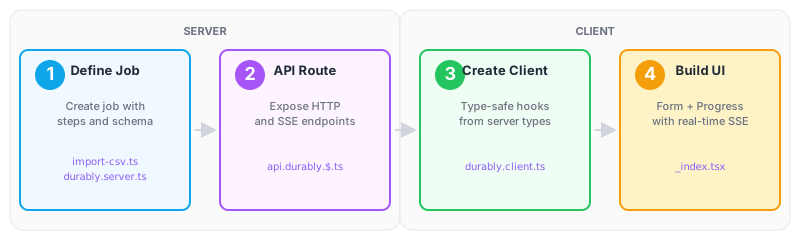
1. Define a Job
Define a job with multiple steps using step.run(). Each step's completion state is automatically persisted to SQLite.
// app/jobs/import-csv.ts
import { defineJob } from '@coji/durably'
import { z } from 'zod'

export const importCsvJob = defineJob({
  name: 'import-csv',
  input: z.object({
    filename: z.string(),
    rows: z.array(z.object({
      name: z.string(),
      email: z.string(),
    })),
  }),
  output: z.object({ imported: z.number() }),
  run: async (step, payload) => {
    step.log.info(`Starting import of ${payload.filename}`)

    // Step 1: Validate
    const validRows = await step.run('validate', async () => {
      step.progress(1, 3, 'Validating...')
      return payload.rows.filter(row => row.email.includes('@'))
    })

    // Step 2: Import
    await step.run('import', async () => {
      for (let i = 0; i < validRows.length; i++) {
        step.progress(i + 1, validRows.length, `Importing ${validRows[i].name}...`)
        // await db.insert('users', validRows[i])
      }
    })

    return { imported: validRows.length }
  },
})
Create a Durably instance and register the job. createDurablyHandler provides HTTP/SSE endpoints for the client.
// app/lib/durably.server.ts
import { createDurably, createDurablyHandler } from '@coji/durably'
import { LibsqlDialect } from '@libsql/kysely-libsql'
import { createClient } from '@libsql/client'
import { importCsvJob } from '~/jobs/import-csv'

const client = createClient({ url: 'file:local.db' })
const dialect = new LibsqlDialect({ client })

export const durably = createDurably({ dialect }).register({
  importCsv: importCsvJob,
})

export const durablyHandler = createDurablyHandler(durably)

await durably.init()
2. Create API Route
Use a React Router splat route to expose the Durably API. This automatically provides /api/durably/trigger, /api/durably/subscribe, and other endpoints.
// app/routes/api.durably.$.ts
import { durablyHandler } from '~/lib/durably.server'
import type { Route } from './+types/api.durably.$'

export async function loader({ request }: Route.LoaderArgs) {
  return durablyHandler.handle(request, '/api/durably')
}

export async function action({ request }: Route.ActionArgs) {
  return durablyHandler.handle(request, '/api/durably')
}
Client
3. Create Type-Safe Client
Create a type-safe client using the server's Durably type. This gives you full type inference for job inputs and outputs.
// app/lib/durably.client.ts
import { createDurablyClient } from '@coji/durably-react/client'
// Type-only import: no server code is bundled, just TypeScript types
import type { durably } from './durably.server'

export const durablyClient = createDurablyClient<typeof durably>({
  api: '/api/durably',
})
4. Build the UI
Build the UI with real-time progress updates.
- action: Trigger the job on the server when form is submitted
- useRun: Subscribe to job progress via SSE
// app/routes/_index.tsx
import { Form } from 'react-router'
import { durably } from '~/lib/durably.server'
import { durablyClient } from '~/lib/durably.client'
import type { Route } from './+types/_index'

// Server: trigger job on form submit
export async function action({ request }: Route.ActionArgs) {
  const formData = await request.formData()
  const file = formData.get('file') as File
  const text = await file.text()
  const rows = text.split('\n').slice(1).map(line => {
    const [name, email] = line.split(',')
    return { name, email }
  })
  const run = await durably.jobs.importCsv.trigger({
    filename: file.name,
    rows,
  })
  return { runId: run.id }
}

// Client: subscribe to real-time progress via SSE
export default function Home({ actionData }: Route.ComponentProps) {
  const { progress, output, isRunning, isCompleted } =
    durablyClient.importCsv.useRun(actionData?.runId ?? null)

  return (
    <div>
      <Form method="post" encType="multipart/form-data">
        <input type="file" name="file" accept=".csv" />
        <button disabled={isRunning}>
          {isRunning ? 'Importing...' : 'Import'}
        </button>
      </Form>

      {progress && (
        <p>Progress: {progress.current}/{progress.total} - {progress.message}</p>
      )}
      {isCompleted && <p>Done! Imported {output?.imported} rows</p>}
    </div>
  )
}
Try It
Create
test.csv:csvname,email Alice,alice@example.com Bob,bob@example.comStart server:
pnpm devUpload the CSV and watch real-time progress!
Resume support: Stop the server mid-import and restart — it picks up right where it left off.
Next Steps
- CSV Import (Full-Stack) — Complete tutorial with dashboard
- Offline App (Browser-Only) — Run entirely in the browser
- Background Sync (Server) — Server-only batch processing